How I Built a Voice-to-Newsletter Agent (and cut my hosting costs by 96%)

Three weeks ago, I had a problem: I wanted to write more newsletters, but the friction was killing me. Opening my laptop, staring at a blank page, formatting in Ghost's editor: it all felt like work. So I built something that lets me record a voice memo on any device (laptop/phone) and have a fully-formatted newsletter ready in under 3 minutes.
Here's the story of how I got there, including the failures, the 6+ hour debugging sessions, and the unexpected cost savings along the way.
The Problem: Newsletter Friction
I have 4,700+ subscribers waiting for content. But between MBA classes, building my company, and life in general, sitting down to write felt impossible. I'd have ideas during walks, in the shower, between meetings, but by the time I could write them down, they were gone.
What I wanted was simple: talk about something, and have it become a newsletter. No typing. No formatting. No friction.
Attempt #1: AppleScript Automation (Failed)
My first approach was classic automation thinking: use AppleScript to control my browser, click buttons, paste content. The code worked… sometimes. But it was brittle:
- Pixel coordinates changed between screen sizes
- UI updates broke selectors
- One window resize and everything failed
Lesson learned: Blind automation without feedback is fragile.
Attempt #2: Two-Window Manual Copying (Failed)
Next, I tried a hybrid approach: have Claude Code generate the content, then I'd manually copy-paste into Ghost. This worked but defeated the purpose: I was still doing manual work, just different manual work.
Lesson learned: Half-automation is sometimes worse than no automation.
The Breakthrough: Claude Code + Memory
The real solution came from rethinking the problem. Instead of automating the UI, I needed to:
- Capture voice naturally using Wispr Flow (voice-to-text that feeds directly into Claude Code)
- Give Claude Code memory so it knows my context, past conversations, and writing style
- Build a skill system where Claude Code knows how to format newsletters
- Use Ghost's API instead of fighting with the UI
The memory piece was crucial. Without it, Claude Code would generate generic AI content. With 3 weeks of collaboration history, it writes in my voice about my actual experiences.
The 6-Hour Debugging Session
Of course, nothing worked the first time. Claude Code has "hooks": automatic triggers that run scripts when certain things happen. Mine kept failing silently. No error messages. Just... nothing.
After 6+ hours of trial and error, I finally found the issue: Claude Code couldn't find my tools because I was giving it shortcut names instead of exact locations.
It's like telling someone "meet me at the coffee shop" vs "meet me at 123 Main Street, Suite B." My computer knew what "coffee shop" meant, but Claude Code running in the background didn't have that context.
Claude Code hooks require absolute paths, not relative shell commands.
Instead of:
bun /path/to/script.jsIt needed:
/Users/kevin/.bun/bin/bun /path/to/script.jsOne tiny change. An entire evening lost. Classic
The Unexpected Win: 96% Cost Reduction
While building this system, I realized that if I intended to continue using Ghost, I would have to pay $63 per month for “Ghost Pro” hosting. Since Ghost is open-source, I questioned the need of this payment when I now have Claude Code to install it on my behalf. (of course, this task was impossible to accomplish before, as I don't code, but now? totally feasible)
Using Claude Code, I migrated to PikaPods (self-hosted Ghost) for $2.60/month. Same newsletter, same 4,700 subscribers, 96% less cost.
The migration wasn't trivial:
- Image migration required a three-phase approach to avoid broken references
- Comments don't migrate: Ghost exports posts, not comments
- DNS configuration with Cloudflare proxy needed careful CNAME setup
- AWS SES DKIM records have complex selectors that standard dig queries miss
- Email warmup planned over 4 weeks (100 → 500 → 1,500 → 4,675 subscribers) to build sender reputation
But Claude Code handled it all. What would have taken me days took hours.
Was it perfect? No. Attachment links broke, and Claude Code wasn't able to identify that. Hours later, readers reached out asking for files that no longer worked. But that's the reality of migrations (for now): you fix what you find as you go.
The Final Pipeline
Here's how it works now:
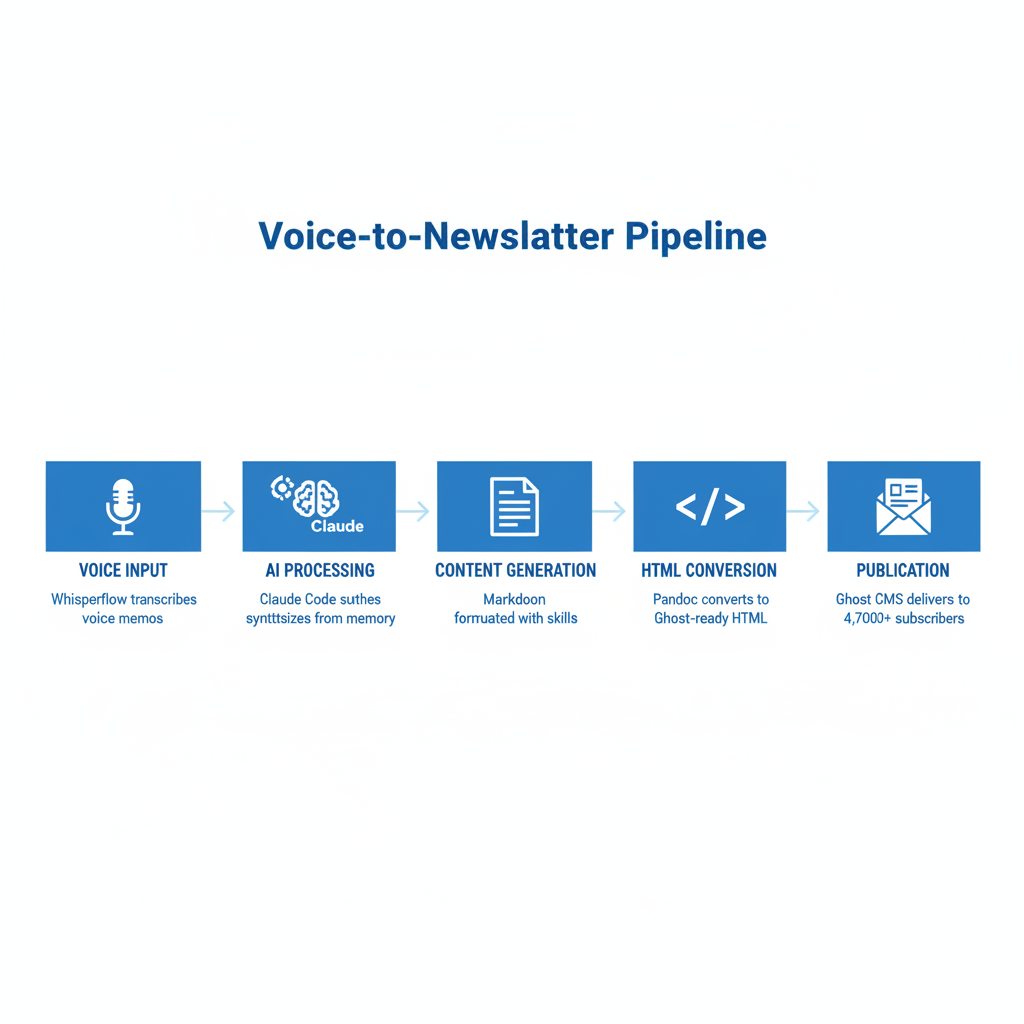
- Voice Input: I record a voice memo using Wispr Flow. I can ramble, go on tangents, think out loud.
- AI Processing: Claude Code receives the transcription, searches my memory layer for relevant context, and synthesizes everything.
- Content Generation: Using my newsletter skill, Claude Code formats the content in markdown with proper headings, emphasis, and structure.
- HTML Conversion: Pandoc converts the markdown to Ghost-compatible HTML (with syntax highlighting disabled for cleaner rendering).
- Publication: The Ghost CLI pushes the draft to my CMS, ready for final review.
Total time: Under 3 minutes from voice memo to draft.
What I Learned
Memory matters more than automation. The reason this works isn't the pipeline: it's that Claude Code has relevant context from me. It knows what I've been working on, what problems I've solved, what my voice sounds like. Without memory, this would just be a fancy transcription service.
Self-hosting is underrated. The 96% cost savings was a side effect, but it's significant. For tools you use daily, owning the infrastructure pays off.
Debug with absolute paths. If your automation is failing silently, check if it has access to your shell environment. It probably doesn't.
What's Next
I'm now using this system to create content across platforms: newsletters, LinkedIn posts, even this article you're reading. The voice-to-content workflow has changed how I think about writing.
If you're interested in building something similar, the key pieces I recommend are:
- Wispr Flow for voice input
- Claude Code with the claude-mem plugin for memory
- Ghost (self-hosted on PikaPods) for publishing
- Custom skills that encode your formatting preferences
The friction is finally gone. Now I just keep building while talking, and the newsletter writes itself.
📹 Full demo in the video below: watch me go from voice memo to published draft in real-time.
Member discussion